
We were recently facing a problem of an integration of a Wallix Application Target “Applications”.
Wallix is connecting via RDP to a RDS server (Windows Server with Remote Desktop Service installed and running with users CAL). The connection is part of a RemoteApp, meaning that the user will not see the full desktop but only the published application.
Wallix Application
While we did similar integration in the past, we were facing an error message. After activating the debug logs on the Bastion, we found such logs:
Feb 22 12:19:40 PAM-BASTION1 rdpproxy[1018716]: INFO (1018716/1018716) -- New Module: MODULE_INTERNAL_CLOSE
Feb 22 12:19:40 PAM-BASTION1 rdpproxy[1018716]: INFO (1018716/1018716) -- Socket RDP Target (9) : closing connection
Feb 22 12:19:40 PAM-BASTION1 rdpproxy[1018716]: INFO (1018716/1018716) -- ~mod_rdp(): Recv bmp update count = 0
Feb 22 12:19:40 PAM-BASTION1 rdpproxy[1018716]: INFO (1018716/1018716) -- ~mod_rdp(): Recv order count      = 287
Feb 22 12:19:40 PAM-BASTION1 rdpproxy[1018716]: INFO (1018716/1018716) -- ~mod_rdp(): Recv bmp cache count  = 7
Feb 22 12:19:40 PAM-BASTION1 rdpproxy[1018716]: INFO (1018716/1018716) -- mod_rdp: Enable graphics update.
Feb 22 12:19:40 PAM-BASTION1 rdpproxy[1018716]: INFO (1018716/1018716) -- mod_rdp: allow suppress output.
Feb 22 12:19:40 PAM-BASTION1 rdpproxy[1018716]: INFO (1018716/1018716) -- mod_rdp: enable input event.
Feb 22 12:19:40 PAM-BASTION1 rdpproxy[1018716]: INFO (1018716/1018716) -- SEND MCS DISCONNECT PROVIDER ULTIMATUM PDU
Feb 22 12:19:40 PAM-BASTION1 rdpproxy[1018716]: INFO (1018716/1018716) -- mod_rdp::disconnect()
Feb 22 12:19:40 PAM-BASTION1 rdpproxy[1018716]: INFO (1018716/1018716) -- Exited from target connection
Feb 22 12:19:40 PAM-BASTION1 rdpproxy[1018716]: INFO (1018716/1018716) -- mod_rdp: Enable graphics update.
Feb 22 12:19:40 PAM-BASTION1 rdpproxy[1018716]: INFO (1018716/1018716) -- mod_rdp: allow suppress output.
Feb 22 12:19:40 PAM-BASTION1 rdpproxy[1018716]: INFO (1018716/1018716) -- mod_rdp: enable input event.
Feb 22 12:19:40 PAM-BASTION1 rdpproxy[1018716]: INFO (1018716/1018716) -- ---<>  Front::must_be_stop_capture  <>---
Feb 22 12:19:40 PAM-BASTION1 rdpproxy[1018716]: INFO (1018716/1018716) -- mod_rdp::draw_event() state switch raised exception = Exception ERR_RAIL_LOGON_FAILED_OR_WARNING no: 22201
Feb 22 12:19:40 PAM-BASTION1 rdpproxy[1018716]: ERR (1018716/1018716) -- Can not redirect user's focus to the WinLogon screen in RemoteApp mode!
Feb 22 12:19:40 PAM-BASTION1 rdpproxy[1018716]: INFO (1018716/1018716) -- ErrorNotificationType=<Unexpected>(0x00000000) "Unexpected Error Notification Type." ErrorNotificationData=LOGON_FAILED_OTHER(0x00000002) "The logon process failed. The user's focus SHOULD be directed to the WinLogon screen."
Feb 22 12:19:40 PAM-BASTION1 rdpproxy[1018716]: INFO (1018716/1018716) -- process save session info : Logon Errors Info
Feb 22 12:19:40 PAM-BASTION1 rdpproxy[1018716]: INFO (1018716/1018716) -- process save session info : Logon extended info
Feb 22 12:19:40 PAM-BASTION1 rdpproxy[1018554]: INFO (1018554/1018554) -- SessionProbeVirtualChannel::process_server_message: "KeepAlive=OK"
Feb 22 12:19:40 PAM-BASTION1 rdpproxy[1018554]: INFO (1018554/1018554) -- SessionProbeVirtualChannel::process_server_message: total_length=14 flags=0x00000003 chunk_data_length=14
Feb 22 12:19:40 PAM-BASTION1 WAB(root)[1018717]: Reporting: reason="CONNECT_DEVICE_SUCCESSFUL" target="Watchguard" message="OK."
Feb 22 12:19:40 PAM-BASTION1 rdpproxy[1018554]: INFO (1018554/1018554) -- SessionProbeVirtualChannel::request_keep_alive: Session Probe keep alive requested
Feb 22 12:19:40 PAM-BASTION1 WAB(root)[1018717]: Call write trace
Feb 22 12:19:40 PAM-BASTION1 rdpproxy[1018716]: INFO (1018716/1018716) -- all_denied=No
Feb 22 12:19:40 PAM-BASTION1 rdpproxy[1018716]: INFO (1018716/1018716) -- all_allowed=Yes
Feb 22 12:19:40 PAM-BASTION1 rdpproxy[1018716]: INFO (1018716/1018716) -- Disable title_extractor
Feb 22 12:19:40 PAM-BASTION1 rdpproxy[1018716]: INFO (1018716/1018716) -- Enable capture:  wrm=yes  png=yes  kbd=no  video=no  video_full=no  pattern=no  ocr=v2   meta=no
Feb 22 12:19:40 PAM-BASTION1 rdpproxy[1018716]: INFO (1018716/1018716) -- ---<>  Front::can_be_start_capture  <>---
Feb 22 12:19:40 PAM-BASTION1 rdpproxy[1018716]: INFO (1018716/1018716) -- SessionProbeVirtualChannel::SessionProbeVirtualChannel: effective_timeout=40000 on_launch_failure=1
Feb 22 12:19:40 PAM-BASTION1 rdpproxy[1018716]: INFO (1018716/1018716) -- FileSystemDriveManager::enable_drive: directory_path="/var/wab/drive_redirection/sespro"
Feb 22 12:19:40 PAM-BASTION1 rdpproxy[1018716]: INFO (1018716/1018716) -- FileSystemVirtualChannel::enable_session_probe_drive: count=1
Feb 22 12:19:40 PAM-BASTION1 rdpproxy[1018716]: INFO (1018716/1018716) -- PDUTYPE2_FONTMAP
Feb 22 12:19:40 PAM-BASTION1 rdpproxy[1018716]: INFO (1018716/1018716) -- WAITING_GRANT_CONTROL_COOPERATE
Feb 22 12:19:40 PAM-BASTION1 rdpproxy[1018716]: INFO (1018716/1018716) -- WAITING_CTL_COOPERATE
Feb 22 12:19:40 PAM-BASTION1 rdpproxy[1018716]: INFO (1018716/1018716) -- WAITING_SYNCHRONIZE
Feb 22 12:19:40 PAM-BASTION1 rdpproxy[1018716]: INFO (1018716/1018716) -- Rdp::receiving the server-to-client Monitor Layout PDU MonitorLayoutPDU monitorCount=1 ((left=0, top=0, right=1439, bottom=730, primary=yes(0x1)))
Feb 22 12:19:40 PAM-BASTION1 rdpproxy[1018716]: INFO (1018716/1018716) -- WAITING_SYNCHRONIZE
Feb 22 12:19:40 PAM-BASTION1 rdpproxy[1018716]: INFO (1018716/1018716) -- mod_rdp::send_fonts done
Feb 22 12:19:40 PAM-BASTION1 rdpproxy[1018716]: INFO (1018716/1018716) -- mod_rdp::send_fonts
Feb 22 12:19:40 PAM-BASTION1 rdpproxy[1018716]: INFO (1018716/1018716) -- use rdp5
Feb 22 12:19:40 PAM-BASTION1 rdpproxy[1018716]: INFO (1018716/1018716) -- mod_rdp::send_control done
Feb 22 12:19:40 PAM-BASTION1 rdpproxy[1018716]: INFO (1018716/1018716) -- mod_rdp::send_control
Feb 22 12:19:40 PAM-BASTION1 rdpproxy[1018716]: INFO (1018716/1018716) -- mod_rdp::send_control done
Feb 22 12:19:40 PAM-BASTION1 rdpproxy[1018716]: INFO (1018716/1018716) -- mod_rdp::send_control
Feb 22 12:19:40 PAM-BASTION1 rdpproxy[1018716]: INFO (1018716/1018716) -- mod_rdp::send_synchronise done
Feb 22 12:19:40 PAM-BASTION1 rdpproxy[1018716]: INFO (1018716/1018716) -- mod_rdp::send_synchronise
Feb 22 12:19:40 PAM-BASTION1 rdpproxy[1018716]: INFO (1018716/1018716) -- Server_resize: Resizing client to : 1440 x 731 x 16
Feb 22 12:19:40 PAM-BASTION1 rdpproxy[1018716]: INFO (1018716/1018716) -- Resizing to 1440x731x16
Feb 22 12:19:40 PAM-BASTION1 rdpproxy[1018716]: INFO (1018716/1018716) -- mod_rdp::recv_demand_active
Feb 22 12:19:39 PAM-BASTION1 rdpproxy[1018716]: INFO (1018716/1018716) -- /* 0000 */ 0xff, 0x03, 0x10, 0x00, 0x07, 0x00, 0x00, 0x00, 0x02, 0x00, 0x00, 0x00, 0x04, 0x00, 0x00, 0x00,  // ................
While all the other message are syslog “INFO” level, this message is an error.
After investigation, it appears that this problem is linked to a Windows notification pop-up or disclaimer which is configured on Windows Server (via GPO). When an user is connecting, after login (after winlogon screen), he gets a notification pop-up. This pop-up can be configured via a local GPO (Local Group Editor) or via a global AD GPO.
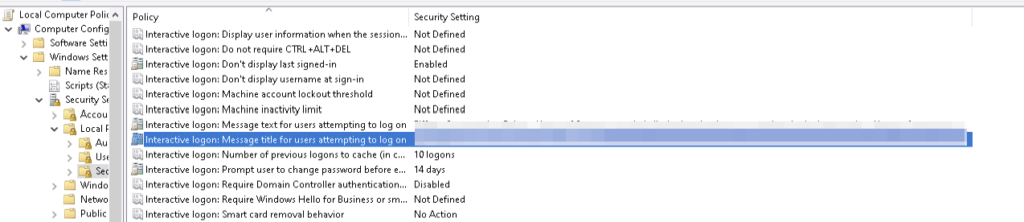
In our case, it was a global GPO. The GPO has been disabled specially on this host and the connection was working.
Benefits of Integrating RDS Applications into WALLIX PAM
Integrating applications delivered through Microsoft Remote Desktop Services (RDS) into WALLIX Privileged Access Management (PAM) provides organizations with a powerful combination of usability, security, and governance. Rather than granting users full desktop or server access, organizations can expose only the specific applications required, while maintaining full control and traceability through the PAM layer.
One of the primary benefits is reduced attack surface. By publishing individual applications via RDS and brokering access through WALLIX PAM, users never gain direct privileged access to the underlying operating system. Credentials are not exposed, shared, or reused, and the RDS server itself is never directly reachable by end users. This approach aligns strongly with the principles of least privilege and zero trust, significantly limiting lateral movement opportunities in the event of a compromise.
Centralized access governance
Centralized access governance is another major advantage. WALLIX PAM allows organizations to define who can access which RDS-hosted application, under what conditions, and for how long. Access can be restricted by role, time window, approval workflow, or business context. This is particularly valuable for administrators, support teams, and third-party providers who require occasional access to sensitive tools without being granted permanent or excessive privileges.
Audit and compliance perspective
From an audit and compliance perspective, integrating RDS applications into WALLIX PAM delivers full session traceability. Every application launch is associated with an identified user, and all actions performed during the RDP session can be recorded and audited. This level of visibility is essential for meeting regulatory requirements such as ISO 27001, NIS2, DORA, or sector-specific standards, where accountability and evidence of control over privileged access are mandatory.
User experience and operational efficiency
The integration also improves user experience and operational efficiency. End users access their authorized applications through a single, centralized entry point managed by WALLIX, without the need for VPNs or complex client configurations. Administrators retain the familiar RDS application publishing model while benefiting from PAM-level controls such as session monitoring, credential vaulting, and just-in-time access. This reduces operational friction while strengthening security controls.
Protection against credential misuse.
Another key benefit is strong protection against credential misuse. WALLIX PAM manages privileged credentials centrally and injects them transparently into RDS sessions when required. Users never see or handle administrative passwords, eliminating risks related to password sharing, reuse, or theft. Automated rotation and policy enforcement further enhance credential hygiene across the environment.
Scalable and future-proof architecture
Finally, integrating RDS applications with WALLIX PAM supports scalable and future-proof architectures. The solution is well suited for hybrid environments, including on‑premises, private cloud, and public cloud deployments. As organizations modernize their infrastructure or onboard new users and applications, the same access model, controls, and audit mechanisms can be consistently applied without redesigning security processes.
In summary, integrating RDS-published applications into WALLIX PAM enables organizations to securely deliver critical tools to users while maintaining strict control, full traceability, and regulatory compliance—without compromising usability or operational efficiency.